
Editor halaman
Dukungan kreator
Edit tata letak halaman dan bagikan dengan .mybook.
Pin aplikasi ini ke Home. Buka dari Home setelahnya.
Tentang aplikasi ini
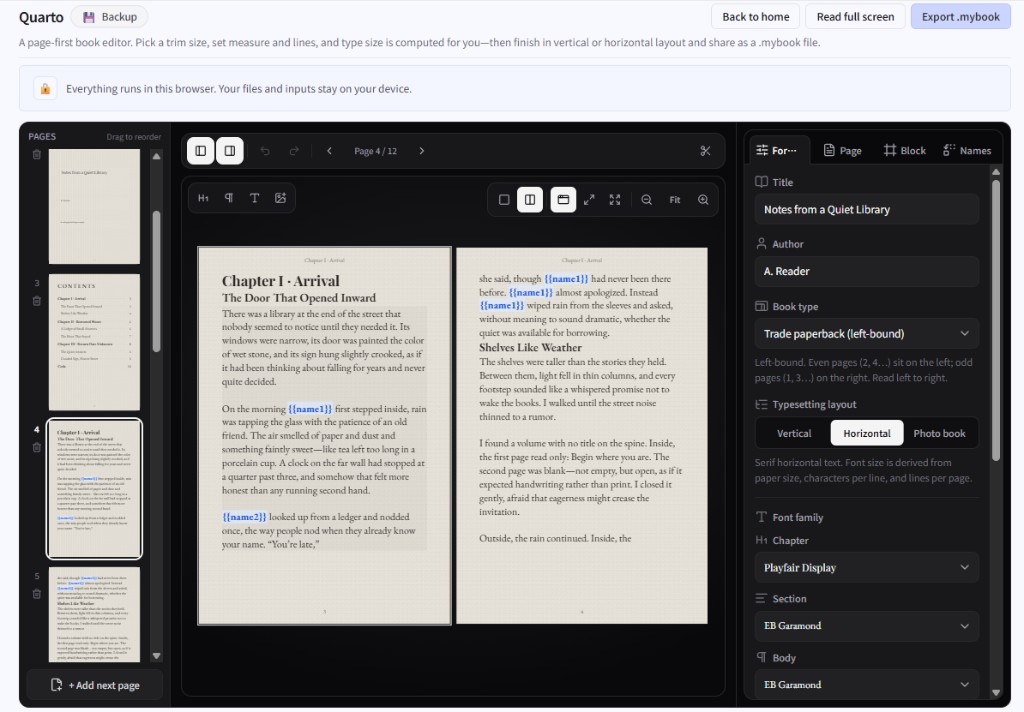
Quarto lets you edit the page as you see it—body, images, running heads, and page numbers—with type size inferred from paper size and characters/lines. Vertical, horizontal, and photo-book-leaning layouts are supported.
Draft zines or booklets, proof the reading feel fullscreen, then share or back up as a .mybook. Name-swap variables can personalize a copy before reading.
Yang bisa Anda lakukan
- WYSIWYG page editing with auto type size from layout settings
- Body, text boxes, images, TOC, running heads, folios, and sample books
- Name-swap variables filled in before reading
- Edit vs fullscreen reading, .mybook export/import, local drafts
Cara mulai
- Start from a blank or sample book, or open a .mybook.
- Set layout and paper, then place text and images.
- Define name-swap variables if you need them.
- Proof fullscreen, then export a .mybook.
Tips
Vertical writing has its own input flow. Large images have a size cap—compress photos before placing them.
Terakhir diperbarui
5 Agustus 2026
Perangkat yang didukung
- Smartphone
- Tablet
- Windows
- Mac