
지면 편집
크리에이터 지원
용지와 조판을 지정해 지면을 직접 편집하고 .mybook으로 공유.
Pin this app to Home. Open it from Home afterward.
About this app
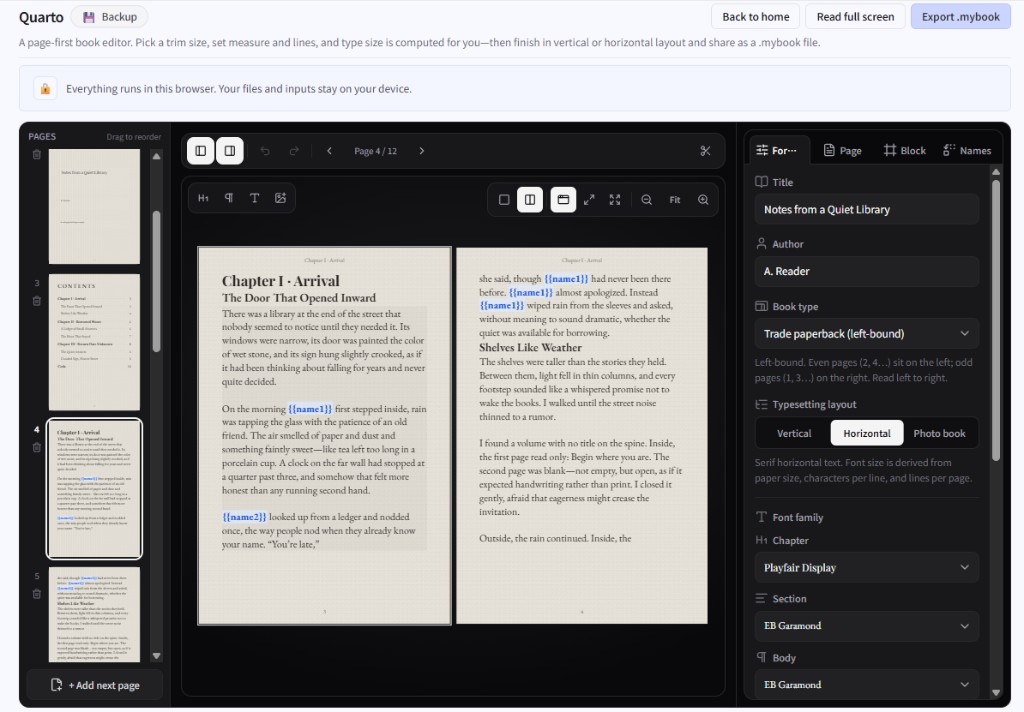
Quarto lets you edit the page as you see it—body, images, running heads, and page numbers—with type size inferred from paper size and characters/lines. Vertical, horizontal, and photo-book-leaning layouts are supported.
Draft zines or booklets, proof the reading feel fullscreen, then share or back up as a .mybook. Name-swap variables can personalize a copy before reading.
What you can do
- WYSIWYG page editing with auto type size from layout settings
- Body, text boxes, images, TOC, running heads, folios, and sample books
- Name-swap variables filled in before reading
- Edit vs fullscreen reading, .mybook export/import, local drafts
Getting started
- Start from a blank or sample book, or open a .mybook.
- Set layout and paper, then place text and images.
- Define name-swap variables if you need them.
- Proof fullscreen, then export a .mybook.
Tip
Vertical writing has its own input flow. Large images have a size cap—compress photos before placing them.
Last updated
2026년 8월 5일
Compatible devices
- Smartphone
- Tablet
- Windows
- Mac