
工作表合并
业务效率
拖动合并工作表。跨表引用有警告,也可按值导出。
Pin this app to Home. Open it from Home afterward.
About this app
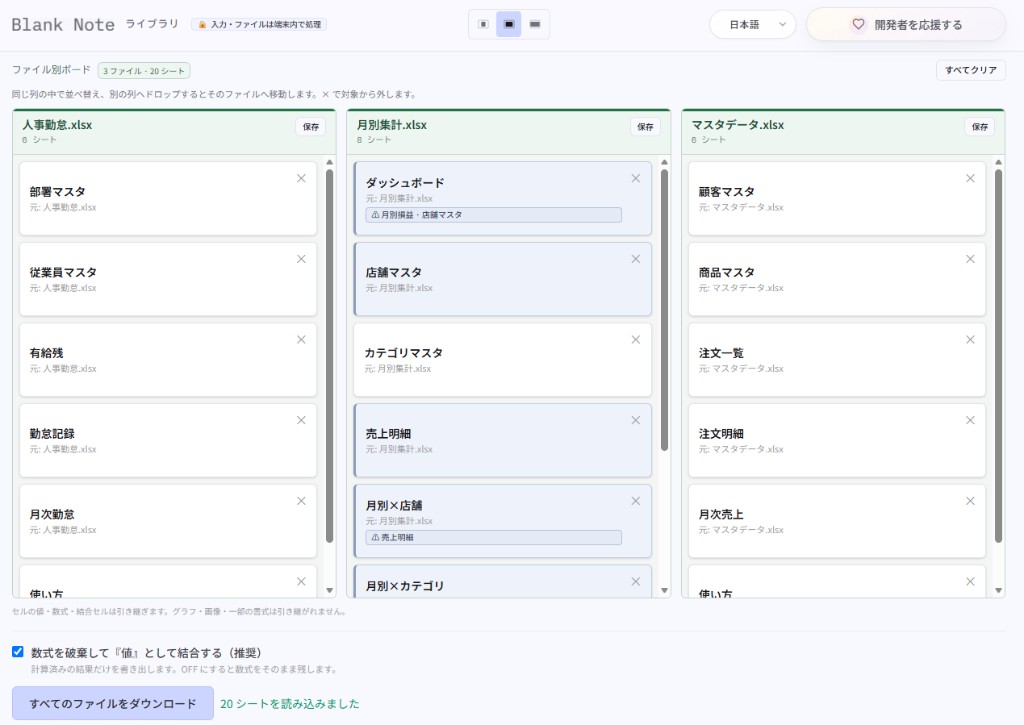
Drop Excel files and each one becomes a vertical column (up to 5). Sheets appear as cards you can reorder in place or drag onto another column to merge them into that workbook.
Formulas, charts, and defined names that point at other sheets are flagged on the card, and related sheets share a light color. On export you can discard formulas and keep calculated values (recommended) to avoid #REF!. Nothing is uploaded—processing stays in the browser. Designed primarily for desktop use.
What you can do
- Up to 5 .xlsx files as kanban columns
- Warns on cross-sheet refs (formulas, charts, names, and more)
- Related sheets share a light matching color
- Export as values (recommended), per column or as a ZIP
Getting started
- Drop .xlsx files into the area at the top (up to 5).
- Reorder sheet cards inside each file column.
- Drag a sheet onto another column to merge it into that file.
- Keep “merge as values” on if you like, then Save a column or Download all files.
Tip
Cards with other-sheet refs show a warning and a shared tint. Turn on “merge as values” when extracting sheets to avoid #REF!. Charts, images, and some styling do not carry over.
Last updated
2026年8月18日
Compatible devices
- Windows
- Mac
- PC recommended